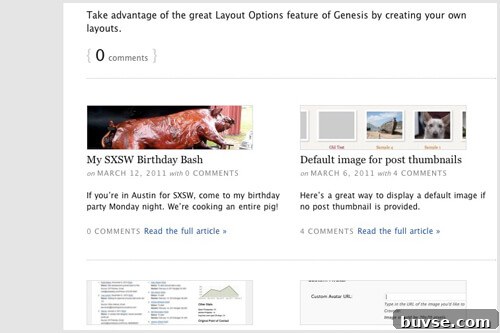
I recently rebuilt my blog using the Genesis Grid Loop, a useful feature of the Genesis framework that lets you present a few large feature posts followed by a grid of smaller posts. The Grid Loop is ideal for showcasing highlighted articles while keeping the rest of your content organized in a clean grid layout.
To get started, consult the official basic and advanced Grid Loop guides (search for “How to Use the Genesis Grid Loop” and “Genesis Grid Loop Advanced”). Once you understand the core loop, you can customize how both the featured posts and the grid posts render. Below I explain how I adapted the loop so grid posts show excerpts, moved thumbnails above grid titles, and added row dividers for visual separation.
- Configure features and grid posts to display the excerpt instead of a truncated portion of the full content, allowing you to write intentional summaries.
- Move the thumbnail on grid posts from below the title to above it.
- Add a visual divider between each row of the grid.
Setup
First, set up the Grid Loop according to the tutorials. In my implementation I used grid_image_size = '0' to prevent the default image from appearing within grid posts. Separately (for example, in functions.php) I registered image sizes such as child_full for feature posts and child_thumbnail for grid entries.
I use a unique prefix for function names and image sizes in my child theme to avoid collisions with other code. In this write-up I use the prefix “child_”—replace that with your own prefix (for example, your initials) to keep your code isolated.
In the child theme I created or edited home.php, which serves as the template for the blog page. Instead of embedding external script references, include your Grid Loop setup directly in that template or require a file from your child theme. Use the code in the tutorials as a base and adapt it to your image sizes and feature/grid counts.
Using the Excerpt
The Grid Loop renders content via the helper function genesis_grid_loop_content() (found in /lib/structure/loops.php in Genesis). To show post excerpts rather than the beginning of the post content, unhook the original genesis_grid_loop_content() and replace it with your own function that outputs the excerpt. It’s best to copy the original function into your child theme and then modify it so the grid output uses the_excerpt() or a custom excerpt wrapper.
Example of the setting I changed in my template (before calling genesis()):
// Replace the default grid loop content with a custom version
remove_action('genesis_loop', 'genesis_grid_loop');
add_action('genesis_loop', 'child_grid_loop');
And when creating the custom content function, make sure to replace the content output with the excerpt call. For example:
function child_grid_loop_content() {
    // ... loop handling and markup ...
    if ( /* is grid post */ ) {
        the_excerpt();
    } else {
        the_content();
    }
    // ... rest of markup ...
}
After implementing your custom grid content function, the blog will display your manual excerpts for grid posts, giving you full control over the summary text shown in the grid.
Thumbnail Above Grid Posts
By default, genesis_grid_loop_content() inserts the grid post image between the title and content. To move that thumbnail above the title, prevent the helper from outputting images for grid posts and add your own image output hooked to a location that runs before the post title.
Add this action inside your grid-switching helper function or setup function:
add_action('genesis_before_post_title', 'child_grid_loop_image');Then implement the image function (placed in your home.php or included file):
function child_grid_loop_image() {
    // Only show for grid posts
    if ( /* condition that checks for grid post */ ) {
        echo genesis_get_image( array( 'size' => 'child_thumbnail' ) );
    }
}
Hooking into genesis_before_post_title ensures the thumbnail appears above the post title for each grid item, matching the visual order you want.
Row Dividers
To visually separate each row in the grid, add an action that outputs a divider (for example, an
) after certain posts. Hook a divider function to genesis_after_post within your grid setup logic:
add_action('genesis_after_post', 'child_grid_divider');Then implement the divider function. The logic should place a divider after every Nth grid post, where N equals the number of columns in your grid. If you also have feature posts at the top of the page, make sure the divider logic ignores those items on the first page.
Example pseudocode for a two-column grid with two features:
function child_grid_divider() {
global $loop_counter, $paged;
// If we are on an even grid item and not a feature on the first page
if ( (($loop_counter + 1) % 2 == 0) && !($paged == 0 && $loop_counter < 2) ) {
echo '
';
}
}Adjust the modulus value (here 2) to match the number of columns in your grid, and change the feature count (here 2) if you use a different number of features.
In your stylesheet (for example, style.css), add styling for the divider. Example:
.grid-divider {
    border: 0;
    border-top: 1px solid #e0e0e0;
    margin: 24px 0;
    width: 100%;
}
Be sure the divider element spans the full grid width; setting width to 100% typically achieves that.
Putting it all together
When finished, your home.php template will replace the default Genesis grid loop content with your customized functions: one to output excerpts for grid posts, one to output thumbnails above titles, and one to insert row dividers after each row. Keep your function names prefixed and place all custom functions before the final genesis() call so the template executes correctly.
These adjustments let you control the precise appearance and structure of the Grid Loop: clear summaries via excerpts, consistent thumbnail placement, and visual separation between rows. With those elements in place you’ll have a cleaner, more readable blog index that highlights feature content while keeping grid items compact and uniform.